Gemini 3.5 Flash for Business: Should You Switch in 2026?


Table of Contents
- Introduction
- What is Gemini 3.5 Flash and what changed in 2026?
- Why does Gemini 3.5 Flash cost more than the old Flash?
- What is Gemini 3.5 Flash good for in business automation?
- Where should you skip Gemini 3.5 Flash?
- Should I switch to Gemini 3.5 Flash or stay on my current stack?
- What are the real implementation caveats of Gemini 3.5 Flash?
- How do I decide what to move to Gemini 3.5 Flash first?
- Frequently Asked Questions (FAQs)
Introduction
There's a familiar itch every time Google ships a new model. A headline lands, your feed fills with demos, and someone on your team asks the question that quietly eats a week: "Should we move our workflows to this?" Right now that model is Gemini 3.5 Flash, which Google announced at I/O on May 19, 2026, and pushed straight to general availability. No preview phase. It's live, it's in the Gemini app, in AI Mode in Search, in the API, and Google is clearly betting on it everywhere.
Here's the catch that trips up a lot of ops owners. "Flash" used to be shorthand for cheap and fast - the model you reach for when you have a million small, boring tasks and you don't want to pay frontier prices. Gemini 3.5 Flash breaks that mental model. It's more capable, aimed at agents and long-horizon work, and it costs more than the previous Flash. So the easy assumption ("Flash equals cheapest") no longer holds, and switching on autopilot can quietly raise your bill without improving a single outcome.
This post is the balanced version of that decision. I'll cover what actually changed, where 3.5 Flash genuinely earns a switch, where you should stay put, and a switch vs stay table you can act on. The goal isn't to chase the shiny thing. It's to route each task to the model that changes a result for your business - and to skip the rest.
What is Gemini 3.5 Flash and what changed in 2026?
Gemini 3.5 Flash is Google's new mid-tier model, and the framing matters more than the name. Google positions it as frontier-level performance for agents and coding, with a focus on complex, long-horizon tasks - the kind where the model has to plan, use tools, and keep its footing across many steps rather than answer a single prompt. That's a real shift from the old Flash identity, which was tuned for high-volume, low-complexity throughput.
The concrete specs back up the agent framing. The model id is gemini-3.5-flash, it has a roughly one million token input window (1,048,576 tokens) and up to 65,536 output tokens, and a knowledge cutoff of January 2025. One thing it does not have is computer use, so if your workflow depends on the model driving a browser or desktop directly, this isn't the model for that.
Around the model, Google shipped the ecosystem it expects you to live in. There's a new Interactions API in beta - Google's take on server-side conversation history, conceptually similar to OpenAI's Responses API - so you don't have to resend full context every turn. There's Gemini Spark, a personal AI agent powered by 3.5 Flash that runs 24/7. And Antigravity 2.0, Google's dev platform, now supports parallel agent workflows and scheduled background tasks. Google also said Gemini 3.5 Pro is coming "next month," and it's expected to land at a higher price point.
Read together, the message is clear: Google wants 3.5 Flash to be the default engine across its stack, not a budget option you bolt on. That's great if your work matches what it's good at. It's a trap if you switch just because it's new.
Why does Gemini 3.5 Flash cost more than the old Flash?
Let's be direct about the part most launch posts skip: 3.5 Flash is more expensive than the previous Flash. Simon Willison summed it up well - it's more expensive, but Google plans to use it for everything. That's not a one-off. It's part of a broader 2026 trend where model prices have been climbing across vendors. GPT-5.5 came in at roughly twice the price of GPT-5.4, and Claude Opus 4.7 landed around 1.46x the cost of 4.6. The era of "every new model is cheaper" is over for now.
Why does this matter so much for a small business? Because the value of a "Flash" tier was always about unit economics at volume. If you're running ten thousand classification calls a day, a small price bump per call turns into a real monthly number. A more capable model that costs more per token is fantastic for the handful of workflows where capability changes the outcome - and quietly wasteful for the bulk of cheap, simple tasks where the old model was already good enough.
So the right lens isn't "is the new model better?" It almost always is, on paper. The right lens is total cost of the change: the price per call, times your volume, against the measurable improvement in the result. If a task already works and customers are happy, a smarter model that costs more is a downgrade to your margin, not an upgrade to your business. Hold that thought - it's the spine of the switch vs stay decision below.
What is Gemini 3.5 Flash good for in business automation?
Now the fair part: there are real jobs where 3.5 Flash is worth paying for. These all share a trait - the task is complex enough that a more capable engine changes whether it succeeds, not just how it phrases the answer.
The strongest fit is long-horizon agent work. If you have a process that needs the model to plan, call several tools in sequence, check its own output, and recover from a wrong turn, 3.5 Flash is built for that. Think multi-step research, reconciling data across systems, or an agent that drafts, validates, and files a document. Older cheap models tend to lose the thread on these; a capable model keeps going.
Coding assistance is another genuine win. For drafting functions, refactoring, reviewing diffs, and explaining unfamiliar code, the jump in capability shows up directly in how much rework you avoid. The same goes for big-context document work. With a million-token input window, you can hand it long contracts, sprawling knowledge bases, or full codebases and ask questions that span the whole thing - tasks that fall apart when you have to chop everything into tiny chunks.
Finally, scheduled background automation is now a first-class idea in Google's stack. With Antigravity 2.0's parallel agents and scheduled tasks, plus an always-on agent like Gemini Spark, you can set up work that runs overnight or on a cadence: a morning briefing, a nightly data cleanup, a recurring report. If those jobs are agentic and would benefit from a stronger reasoner, this is a clean fit. Just make sure the job is one where the smarter model actually moves a number you care about.
Where should you skip Gemini 3.5 Flash?
Skipping is a strategy, not a failure. There are clear cases where moving to 3.5 Flash adds cost without adding value, and naming them saves you money.
The biggest one is high-volume, low-complexity work. Classification, tagging, simple extraction, short formatting, routing tickets by keyword - if a cheaper Flash or a small model like Haiku already handles these well, a pricier model is pure overhead. You'd be paying frontier rates to do work that never needed frontier reasoning. Multiply that across your daily volume and the difference is real.
Skip it too if you're mid-rollout on a working stack. Swapping the model under a live workflow means re-testing prompts, re-checking edge cases, and re-validating outputs - a hidden tax that can stall a launch you're close to shipping. A working pipeline that you understand is worth more than a marginally smarter one you have to re-prove.
And skip it for anything that needs computer use, because this model doesn't have it. If your automation depends on the model operating a browser or app directly, 3.5 Flash can't do that job, full stop. The same caution applies when freshness is critical: with a January 2025 knowledge cutoff, the model doesn't know recent events on its own. You can fix that with retrieval and tools, but if you were hoping the model "just knows" current information, plan for the extra plumbing.
Should I switch to Gemini 3.5 Flash or stay on my current stack?
Here's the honest answer most people don't want: it depends on the task, not on the model. The mistake is treating this as one big yes-or-no decision for your whole business. It isn't. Some of your workflows should move today, most should stay, and a few are worth a quick test before you decide.
The deciding question for each workflow is simple: does the extra capability change an outcome you can measure? If a smarter model means an agent finally completes a multi-step job it used to fail, or a coding task needs half the rework, that's an outcome - switch it. If the only change is slightly nicer wording on a task that already works, that's not an outcome worth a higher bill - stay.
How do I read the switch vs stay decision table?
Use the table below as a first pass. Match your workflow to the closest row, then sanity-check it against your own volume and quality bar before you commit.
| Your workflow | Switch to 3.5 Flash? | Why |
|---|---|---|
| Long-horizon agent tasks (multi-step, tool-using) | Switch | Capability changes whether the job completes |
| Coding assist, refactoring, code review | Switch | Less rework directly offsets the higher price |
| Big-context document work (long docs, large codebases) | Switch | 1M-token window handles whole-document reasoning |
| Scheduled background automations that need reasoning | Switch / test | Antigravity 2.0 fits; confirm the gain is real |
| High-volume classification, tagging, simple extraction | Stay | Cheaper model already works; price bump is waste |
| Mid-rollout on a stable, working pipeline | Stay | Re-testing cost outweighs marginal gains |
| Workflows needing computer use | Stay | 3.5 Flash has no computer use |
| Tasks needing fresh, post-Jan 2025 knowledge | Test with retrieval | Works only with tools/RAG bolted on |
The pattern across the "switch" rows is capability that changes results. The pattern across the "stay" rows is cost without a matching outcome. When a row says "test," it means run the model on your real data for a few days and compare - don't trust a benchmark or a demo to predict your specific task.
What are the real implementation caveats of Gemini 3.5 Flash?
Even on the workflows that pass the switch test, a few practical things will bite if you ignore them.
Start with the knowledge cutoff. January 2025 means the model is blind to anything recent unless you feed it. For most business automation that touches current data - prices, inventory, this week's tickets, today's news - you'll need retrieval, search tools, or your own database in the loop. That's normal, but it's work, and it changes your cost and latency, so budget for it.
Next, the Interactions API is still in beta. It's promising for managing conversation history server-side, but beta means moving parts. If you build a core workflow on it, expect changes and keep a fallback. Treat it as something to pilot, not something to bet a customer-facing flow on yet.
Then there's price sensitivity at volume. The same higher per-token cost that's fine for a few hundred agent runs becomes a line item you'll notice at scale. Before you flip a high-traffic workflow, do the simple math: price per call times monthly volume, then compare to what you run today. Small numbers per call add up fast.
Finally, mind the vendor pull. Spark, Antigravity, the Interactions API, and 3.5 Flash are designed to work together, which is convenient and also a gentle form of lock-in. There's nothing wrong with going deep on one stack if it serves you - just make the choice on purpose, and keep your prompts and logic portable enough that switching later isn't a rebuild. And whatever you do, test on your real tasks before you commit. A model that tops a public leaderboard can still underperform on your specific data, and the only benchmark that matters is yours.
How do I decide what to move to Gemini 3.5 Flash first?
If you only take one thing from this, make it this: route by task, not by hype. Don't migrate your business to a model. Move the specific workflows where 3.5 Flash's agentic gains change a result, and leave everything else alone. That single discipline keeps your costs sane and your improvements real.
A simple way to start. List your current AI-touched workflows. For each, write down the volume, the cost today, and the one outcome that would improve if the model were smarter. Most rows won't have a meaningful outcome to gain - those stay. A few will - those are your candidates. Run a short, real-data test on the candidates, compare quality and cost honestly, and switch only the ones that win on both. That's it. No big migration, no all-or-nothing bet.
The reason this is hard isn't technical. It's prioritization - knowing which of your workflows are worth the change and which are fine as they are. That's exactly the kind of call that's easier with a second set of eyes and a clear framework. If you want help mapping your workflows to the right models and deciding what to move first, that's what my 45-minute AI roadmap call is for. We'll look at your actual workflows, find the ones where a switch changes an outcome, and leave the rest alone so you don't spend a rupee chasing a model you didn't need. You can book it at /roadmap-call.
Frequently asked questions
Quick answers on the topics covered in this article.
No. Gemini 3.5 Flash is more expensive than the previous Flash. It's part of a broader 2026 trend of rising model prices across vendors. The old "Flash means cheapest" assumption no longer holds, so check price per call against your volume before switching high-traffic workflows.
It depends on the task, not the model. Switch workflows where extra capability changes a measurable outcome - long-horizon agents, coding assist, big-context document work. Stay on your current stack for high-volume simple tasks, stable pipelines mid-rollout, or anything needing computer use.
Complex, long-horizon agent tasks that need planning and tool use, coding assistance and refactoring, big-context document work using its roughly one-million-token input window, and scheduled background automations through Antigravity 2.0. These are jobs where a stronger reasoner changes whether the task succeeds.
Skip it for high-volume, low-complexity work like classification, tagging, and simple extraction where a cheaper model already works. Skip it mid-rollout on a stable pipeline, and skip it for anything that needs computer use, since this model doesn't support that.
No. Gemini 3.5 Flash does not include computer use. If your automation depends on the model directly operating a browser or desktop app, this model can't do that job, and you'll need a different tool for it.
The knowledge cutoff is January 2025. The model doesn't know events after that date on its own. For workflows that need current information, you'll need to add retrieval, search tools, or your own data so the model has fresh context.
It supports about one million input tokens (1,048,576) and up to 65,536 output tokens. The large input window makes it well suited to whole-document reasoning, like long contracts, large knowledge bases, or full codebases in a single request.
The Interactions API is Google's beta feature for server-side conversation history, similar in spirit to OpenAI's Responses API. It's useful for managing context without resending it each turn, but it's still beta. Pilot it rather than building a core customer-facing flow on it yet.
List your AI workflows with their volume, current cost, and the one outcome that would improve with a smarter model. Most won't have a real gain - those stay. Test the few that do on real data, and switch only the ones that win on both quality and cost.
No. Route by task instead of migrating everything. Move only the specific workflows where the agentic gains change a result, and leave the rest. An all-or-nothing switch usually raises cost without improving outcomes, and adds avoidable vendor lock-in.
Share this article
Related workflows
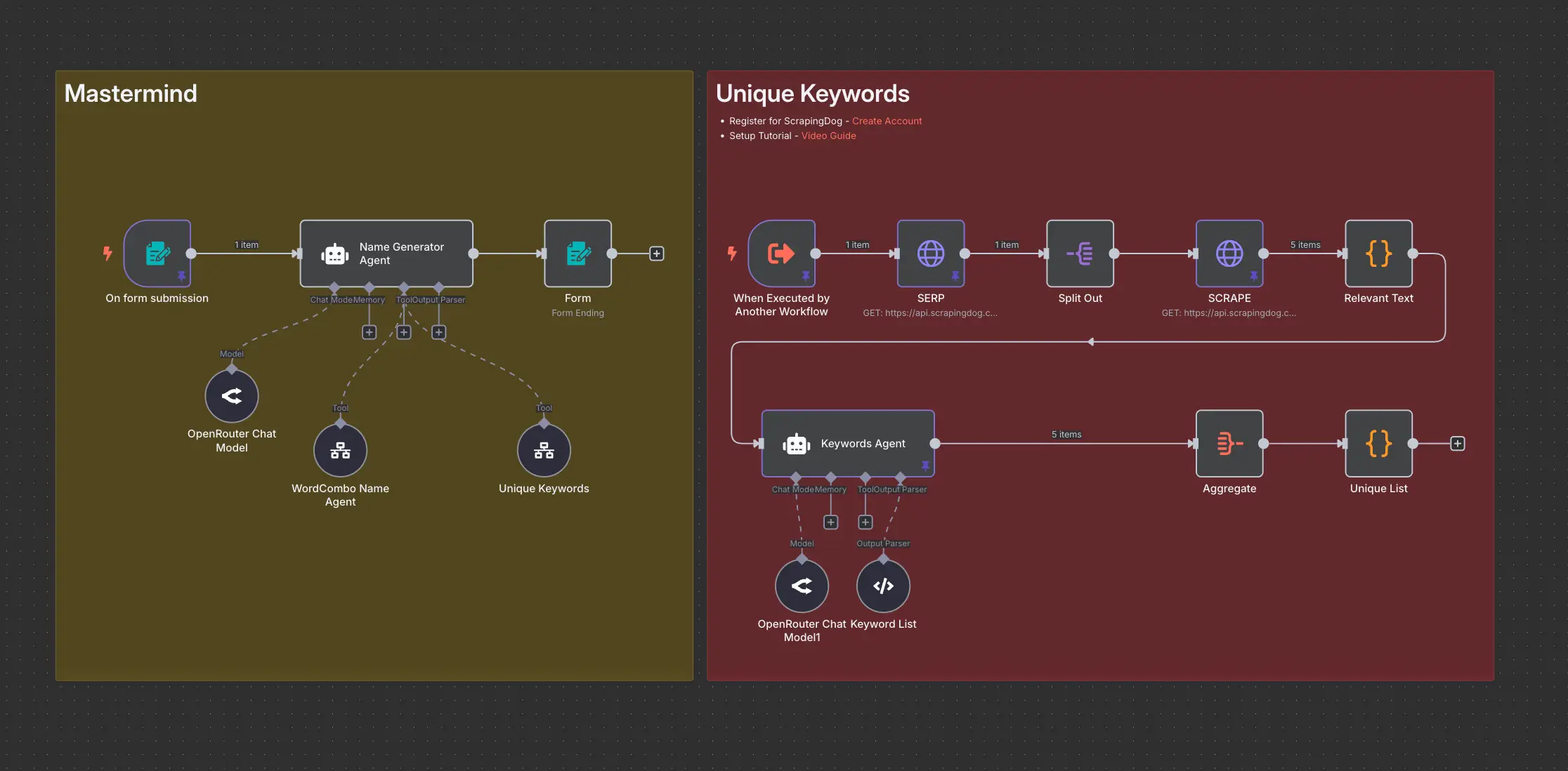
Domain Name Generator n8n workflow using ScrapingDog