Gemini Spark 24/7: Which Workspace Workflows Fit? (2026)
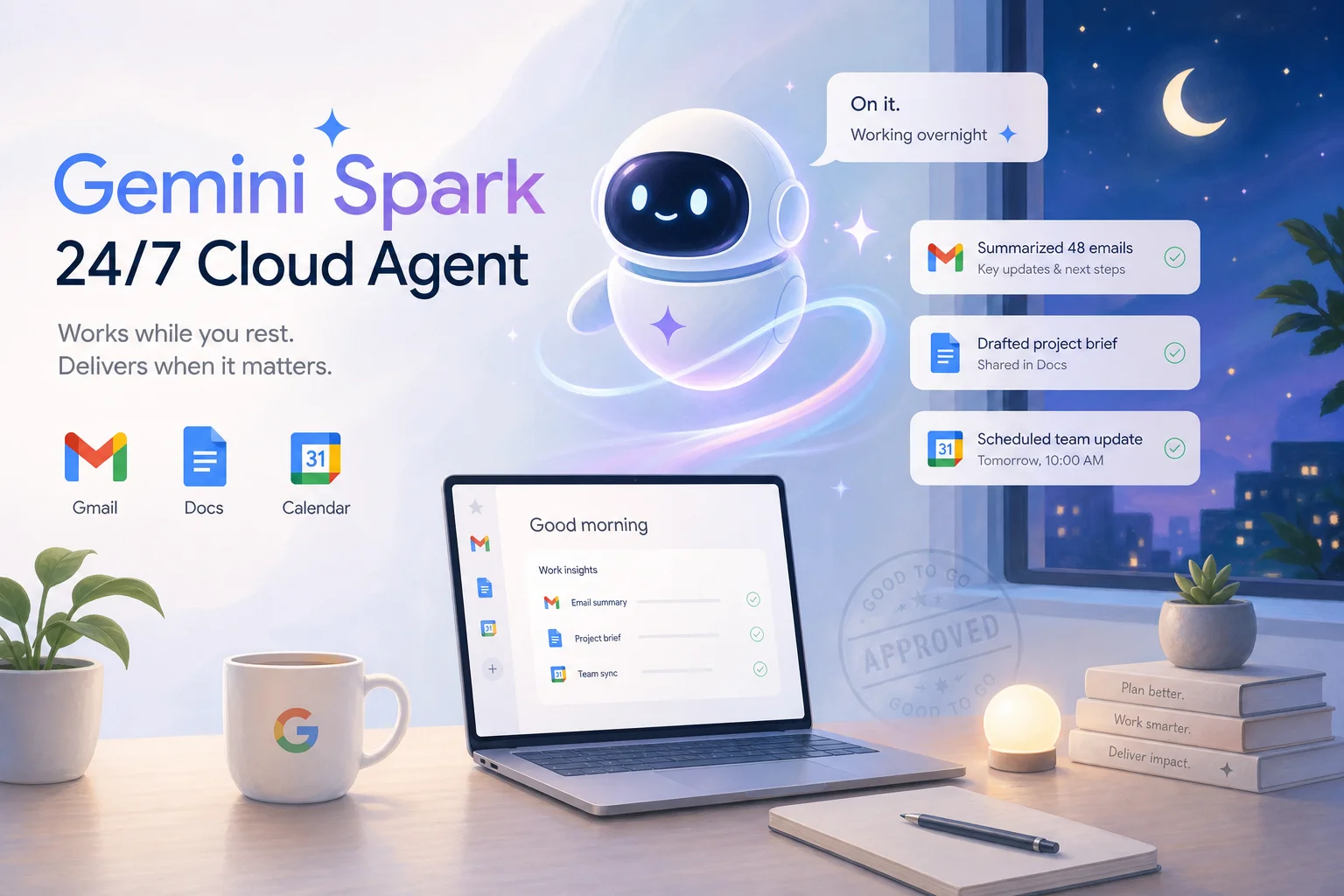

Table of Contents
- Introduction
- What is Gemini Spark and how does the Google Workspace AI agent work in 2026?
- Why does Gemini Spark business automation sound like overnight ops relief?
- How do VM-backed background tasks in Antigravity 2.0 actually run?
- Which Google Workspace workflows are safe wins for Gemini Spark?
- Which workflows should you skip with Gemini Spark business automation?
- When does Gemini Spark beat Claude Cowork and n8n?
- How do you design approval gates for a Google Workspace AI agent?
- What is the weekly checklist to pilot Gemini Spark safely?
- When should you book a roadmap call for background workflow automation?
- Frequently Asked Questions (FAQs)
Introduction
Google I/O on May 19, 2026 did not just ship another model. It shipped a promise: Gemini Spark, a 24/7 personal AI agent that keeps working when your laptop is closed, your phone is locked, and you are asleep. For anyone drowning in Gmail threads, scattered meeting notes, and Monday ops reports, that headline lands like relief.
Then you read the fine print. Spark is rolling out in beta to U.S. Google AI Ultra subscribers. It runs on Gemini 3.5 Flash inside an Antigravity agent harness. It can draft emails, assemble Docs, and chain recurring tasks across Workspace. It is also tied to individual accounts, governed by consumer-grade prompts, and carries no production SLA. That is a very different thing from "we automated overnight ops."
This post goes deeper than a model switch decision. If you already weighed Gemini 3.5 Flash for business, you know the economics. Here we focus on Spark specifically: which Google Workspace workflows are worth handing to an always-on agent, which ones you should skip, and when you are better off with Claude Cowork scheduled tasks, n8n, or Gemini API managed agents. The throughline is simple. Treat Spark as a resident knowledge worker with background powers, not as your company's production runbook.
What is Gemini Spark and how does the Google Workspace AI agent work in 2026?
Gemini Spark is Google's 24/7 personal AI agent, announced at I/O on May 19, 2026, and powered by Gemini 3.5 on the Antigravity harness. It lives in the Gemini app and connects deeply to Gmail, Docs, Sheets, Slides, Drive, and Calendar so it can read, write, and organize across the surfaces your team already lives in.
Three building blocks define how the Google Workspace AI agent works in practice. First, you can set recurring tasks or triggers, like parsing monthly credit card statements to flag new subscription fees. Second, you can teach Spark new skills, such as checking your inbox for school updates and sending a consolidated daily digest. Third, you can chain these into complete workflows, like synthesizing meeting notes from emails and chats into a polished Google Doc plus a draft kickoff email. Google also said Spark will ask before high-stakes actions like spending money or sending emails, and that MCP-style connectors to Canva, OpenTable, and Instacart are launching alongside it.
Availability matters for planning. Spark is starting with trusted testers and rolling out as a beta for U.S. Google AI Ultra subscribers. Daily Brief, a related morning-digest agent, is rolling out to Plus, Pro, and Ultra users in the U.S. A macOS Gemini app with Spark support is slated for later in 2026. If your team is outside the U.S. or not on Ultra, you are watching from the sidelines for now, not deploying.
Why does Gemini Spark business automation sound like overnight ops relief?
Gemini Spark business automation sounds like overnight ops relief because Google explicitly markets cloud persistence: Spark keeps working when you close your laptop. That is a real shift from assistants that only help while you are in the app. Combined with recurring tasks and Workspace integration, it reads like a background ops layer that triages email, assembles reports, and preps meetings while you sleep.
The gap is governance, not capability. Spark is a user-centric agent tied to individual Google accounts and their permissions. It does not give you team-level version control, job run histories, or alerting dashboards the way n8n does. It is in beta on a premium consumer tier, not an enterprise operations product with an uptime target. And "24/7" does not mean production-ready. It means the agent can keep running in Google's cloud, not that your business has SLAs, audit trails, or rollback plans.
Teams that treat Spark as overnight ops without approval gates risk the same failure mode as unchecked Cowork schedules: drafts that look authoritative, actions that slip through on a busy morning, and no clear owner when something goes wrong. The fix is not to ignore Spark. It is to route only low-blast-radius, Workspace-centric, easily reversible work to it first, and keep customer-facing sends, money, and compliance workflows elsewhere.
How do VM-backed background tasks in Antigravity 2.0 actually run?
VM-backed background tasks in Antigravity 2.0 run Spark workflows in isolated cloud environments instead of inside a browser tab or chat session. Google positions Antigravity 2.0 as the agent harness behind Spark, with support for parallel agent workflows and scheduled background jobs. That means a task taking twenty or thirty minutes, or touching many Workspace APIs in sequence, can complete without timing out on a single request.
Practically, this gives you three behaviors that matter for Gemini Spark business automation. Stateful execution lets a workflow keep temporary files and partial outputs across steps without stuffing everything into a long chat thread. Long-running jobs can finish overnight while you are offline. Isolated environments mean each workflow runs with its own resource limits, which is security-positive but also means you need to think about where data lives and how you audit access.
This is why Spark feels different from Claude Cowork scheduled tasks, which require your desktop app and computer to stay powered on. Spark's VM-backed model flips that: the work runs in Google's cloud regardless of your device state. It is closer to what you would want for a Monday morning briefing or a nightly inbox digest. It is still not the same as a managed agent API with explicit orchestration, logging, and evaluation hooks. For that layer, see Google managed agents and the Gemini API.
Which Google Workspace workflows are safe wins for Gemini Spark?
Safe wins for Gemini Spark sit on the low-impact, Workspace-centric, easily reversible side of the spectrum. These are jobs where natural-language judgment helps and a mistake costs minutes, not customers.
Morning and weekly briefings are the clearest fit. Pair Spark with Daily Brief to synthesize urgent Gmail threads, today's Calendar events with linked doc context, and action items from recent Docs. A team lead version can digest everything updated in a shared Drive folder and flag blockers mentioned in internal email. Keep outputs read-only: Spark collates and prioritizes; you decide what to act on. This overlaps with the Monday ops pain described in automating KPI pulls without a BI tool, but Spark handles the narrative synthesis inside Workspace rather than cross-system data pulls.
Inbox triage and draft-only replies work when you enforce "draft, never send." Spark can label threads, summarize each one, propose priority, and draft replies referencing linked Drive docs. You review and send. Configure skills so Spark cannot email more than one recipient without explicit approval.
Meeting prep, notes, and follow-up stay mostly internal. Spark can build a one-pager before each meeting from past notes and linked Sheets, clean up transcripts into action items, and draft follow-up emails you approve before they leave your account.
Internal reports and slide decks in draft mode save grunt work. Weekly project status docs assembled from a Drive folder plus a tracking Sheet, or quarterly review decks built from an outline and spreadsheet data, are slow-moving and easy to iterate on.
Use this quick filter before you teach Spark a new skill:
| Signal | Spark-safe? |
|---|---|
| Blast radius if wrong is minutes, not revenue | Yes |
| Output stays inside Workspace until you publish | Yes |
| Mistake is easy to undo (draft doc, label, note) | Yes |
| Needs CRM, billing, or warehouse APIs | No - use n8n |
| Contractual SLA or regulatory audit trail | No - use orchestrator |
Which workflows should you skip with Gemini Spark business automation?
You should skip customer-facing sends at scale, financial transactions, incident response, HR and compliance actions, and anything with a strict SLA when using Gemini Spark business automation as the primary executor.
Mass customer email belongs in your ESP or CRM with template version control and send logs. Spark can draft copy; it should not press send on newsletters or policy updates to thousands of recipients.
Money and procurement stay experimental even with MCP connectors. A single "Are you sure?" prompt is not a finance approval workflow. Let Spark prepare purchase justifications in a Doc; keep the buy button human-only.
Incident response and on-call need deterministic runbooks tied to monitoring tools, not a personal Workspace agent. Spark can draft postmortems afterward; it should not page your team or execute remediation.
HR and compliance carry legal weight that an emergent agent outside your HRIS cannot safely own. Draft internal comms, yes. Performance actions or attestations, no.
Regulated or SLA-bound workflows need tools with job histories, retries, and dashboards. Spark is a supporting actor here: summarizer, drafter, helper. Execution stays in n8n or managed agents.
If you are building the cross-system version of Monday reporting, with Stripe, ads, and CRM in one pipeline, that is orchestrator territory, not Spark's sweet spot.
When does Gemini Spark beat Claude Cowork and n8n?
Gemini Spark beats Claude Cowork when your workflow is Workspace-centric and must run while your devices are off; it beats n8n when the job is ambiguous synthesis across email and docs where occasional mis-prioritization is cheap.
Spark vs Cowork: Cowork excels at desktop-rich work: local files, browser automation, legacy apps on one machine. Its scheduled tasks need the Claude desktop app and a powered-on computer. Spark runs VM-backed jobs in Google's cloud and owns Gmail, Docs, Sheets, Slides, and Calendar natively. If your team lives in Workspace all day and wants a morning brief or inbox digest without babysitting a Mac, Spark wins. If you need to operate local tools or a specific desktop environment, Cowork wins. For a deeper Cowork vs hiring lens on weekly digests, see same support questions weekly: Cowork scheduled tasks vs hire.
Spark vs n8n: n8n wins when workflows touch payment processors, CRMs, data warehouses, and bespoke APIs with retries, branching, and team-maintained version control. Spark wins when inputs and outputs are mostly emails, docs, slides, and calendar events, and the task benefits from LLM judgment rather than deterministic logic.
The sustainable pattern: Spark for personal and team productivity inside Workspace. Gemini API agents plus n8n for cross-system, business-critical automation. Keep responsibilities distinct so you do not bolt production SLAs onto a beta personal agent.
| Need | Best fit |
|---|---|
| Cloud 24/7 Workspace synthesis | Gemini Spark |
| Desktop files and local apps | Claude Cowork |
| Multi-system APIs with audit logs | n8n |
| Production agent backbone | Gemini API managed agents |
How do you design approval gates for a Google Workspace AI agent?
Design approval gates by defaulting to draft-only outputs, naming concrete review artifacts, and encoding policies in the skills you teach Spark—not by relying on Google's built-in "ask before high-stakes actions" alone.
Draft-don't-send is the baseline for any email workflow. Teach Spark that its job is to save drafts and summarize what it did. Add an explicit rule: ask before sending to more than one recipient. You reinforce this in initial instructions and in every skill you create.
Named review docs for money and commitments make review steps concrete. Example instruction: "Create a Doc titled Spark Purchase Proposal in this folder with your recommended option, pros, cons, and links. Wait for my approval before any purchase."
Read-only briefings should never trigger sends or calendar changes without a second prompt. Spark collates; you act.
Scope connectors narrowly. MCP hooks to Canva or OpenTable are convenient; treat them as experimental until you have a review pattern that works.
Here is a starter skill you can paste when teaching Spark an inbox workflow:
You are my inbox triage assistant. Rules:
1. Label and summarize threads; never send email.
2. Draft replies only when I mark a thread "needs response."
3. Save all drafts; summarize what you did in a daily Doc.
4. Ask before any action touching more than one person.
5. If unsure, stop and ask.
That is not enterprise governance. It is enough to keep a beta agent from becoming an invisible co-worker with send permissions.
What is the weekly checklist to pilot Gemini Spark safely?
Pilot Gemini Spark with one background workflow, measure for two weeks, and expand only if quality and time saved beat the review tax.
Week 1 - setup
- Confirm Ultra beta access and U.S. availability for the account owner.
- Pick one workflow from the safe-wins list (briefing, inbox triage, or meeting follow-up).
- Write a one-page skill doc with draft-only rules and folder paths.
- Connect only the Workspace apps that workflow needs; defer MCP connectors.
- Run the workflow manually once alongside Spark to compare output quality.
Week 2 - measure
- Track minutes saved versus minutes spent reviewing Spark output.
- Log every error or near-miss (wrong priority, missing thread, off-tone draft).
- Confirm no unsent drafts were accidentally sent.
- Ask one teammate if the briefing or digest changed a decision.
- Decide: keep, tune the skill, or graduate to n8n for the cross-system version.
Daily habits while piloting
- Skim Spark's output before your first meeting, not after your last.
- Thumbs-up or thumbs-down on Daily Brief items to steer prioritization.
- Never add a second workflow until the first one runs cleanly for five consecutive days.
When should you book a roadmap call for background workflow automation?
Book a roadmap call when you have identified one background workflow worth automating but need help choosing between Spark, Cowork, n8n, and managed agents, and defining the approval gates that make it safe.
Most teams do not have a Spark problem. They have a prioritization problem. Three workflows compete for attention: the Monday ops report, the inbox triage nobody owns, and the meeting follow-up that dies in Slack. Each could use Spark, Cowork, or n8n depending on where the data lives and who must approve outputs. Picking wrong costs a month of re-work.
On a 45-minute AI roadmap call, we map one background workflow end to end: inputs, approval points, blast radius if wrong, and the right tool for v1. You leave with a ranked backlog, not a vendor pitch. If Spark fits, you will know which skill to teach first. If it does not, you will know whether n8n, managed agents, or a Cowork schedule is the better starting point.
Spark is exciting because it runs while you sleep. It is safe only when you decide what it is allowed to do before you close the lid. Start with one draft-only workflow, measure for two weeks, and keep everything with customer, money, or compliance impact on a platform built for production.
Frequently asked questions
Quick answers on the topics covered in this article.
Gemini Spark is a 24/7 personal AI agent powered by Gemini 3.5 on Google's Antigravity harness. Unlike standard Gemini chat, Spark runs cloud-based background tasks across Gmail, Docs, Sheets, Slides, and Calendar even when your devices are off, and supports recurring tasks, teachable skills, and multi-step workflows.
Spark is rolling out to trusted testers first, then as a beta for U.S. Google AI Ultra subscribers. Daily Brief, a related morning-digest feature, is rolling out to Plus, Pro, and Ultra users in the U.S. Availability varies by subscription tier and geography.
No. Spark is a beta personal agent without enterprise SLAs, team-level audit logs, or orchestration dashboards. It fits low-blast-radius Workspace workflows with human approval gates, not customer-facing sends, financial transactions, or regulated processes.
Safe wins include morning and weekly briefings, inbox triage with draft-only replies, meeting prep and follow-up drafts, and internal reports or slide decks that stay inside Workspace until a human publishes them. Keep outputs reversible and review every send.
Skip mass customer email, payments and procurement, incident response and on-call paging, HR and compliance actions, and any workflow with contractual SLAs or regulatory audit requirements. Use n8n or Gemini API managed agents for those.
Antigravity 2.0 runs Spark workflows in isolated cloud VMs so jobs can maintain state, run longer than a chat session, and complete while your laptop is closed. That is how Spark delivers 24/7 execution without tying work to a browser tab.
Spark wins for Workspace-centric workflows that must run in the cloud while your devices are off. Cowork wins when you need desktop file access, browser automation, or local app control on a specific machine that stays powered on.
Spark beats n8n for ambiguous synthesis across email, docs, and calendar where LLM judgment matters and mistakes are cheap. n8n wins when workflows touch CRMs, billing, warehouses, and custom APIs and need retries, logs, and team-maintained version control.
Default to draft-don't-send for email, require named review Docs before money or commitments, keep briefings read-only, and encode rules in the skills you teach Spark. Do not rely only on Google's built-in prompts before high-stakes actions.
Start with one draft-only workflow: a morning briefing, inbox triage with labeled summaries, or meeting follow-up drafts. Run it for two weeks, track minutes saved versus review time, and expand only after five clean days.
Share this article
Related workflows