What Are Apify Actors and Why Are They So Useful in 2026?

Table of Contents
- Introduction
- What Are Apify Actors and How Do They Work?
- Why Are Apify Actors More Useful Than Traditional Scrapers for Teams?
- Which Business Workflows Get the Highest ROI from Apify Actors?
- How Do You Run Apify Actors in a Production Stack?
- What Do Cost, Security, and Governance Look Like at Team Scale?
- How Do You Decide Build vs Buy in the Apify Store?
- What Mistakes Make Apify Actor Projects Fail?
- Frequently Asked Questions (FAQs)
Introduction
Apify Actors are one of those tools that look simple on day one and become strategic by month three.
At first, many teams treat them as "just scraping scripts in the cloud." That framing is too small. In practice, Actors become reusable automation units for data collection, monitoring, enrichment, and delivery. You define input, run logic, and output, then wire those runs into your real business systems. The value is not only extraction speed - it is reliability, repeatability, and operational clarity.
If your team depends on changing web data - competitor pricing, marketplace listings, lead intelligence, review signals, policy updates, inventory snapshots, hiring patterns - Apify Actors can reduce manual work and dramatically improve decision speed. Instead of analysts opening twenty tabs every morning, your pipeline runs on schedule, writes structured data, and triggers alerts only when something meaningful changes.
This guide breaks down what Actors are, why they are useful, and how to adopt them with a team-level mindset. The goal is not hobby automation. The goal is dependable automation that leaders can trust in production.
What Are Apify Actors and How Do They Work?
An Apify Actor is a packaged automation program that runs on Apify infrastructure. It can open pages, interact with websites, extract and transform data, and store output in a structured way. You can run it once, on a schedule, via API, or as part of a larger workflow.
The easiest mental model is: an Actor is a job with a contract.
- Input contract: what parameters the job accepts.
- Execution logic: what the job does.
- Output contract: what data it returns and where it stores it.
Because this contract is explicit, Actors are composable. One Actor can collect raw data, another can normalize it, and a third can push it to your CRM, warehouse, or Slack channel.
How Is an Apify Actor Different from a One-Off Script?
A one-off script usually solves one urgent problem once. An Actor is designed to be run, monitored, reused, and shared. That difference is exactly why teams get long-term value from Actors.
With scripts, the "ops tax" grows silently: credentials break, websites change markup, retries are not implemented, and no one owns alerting. With Actors, the platform gives you consistent run history, logs, scheduling, and standardized storage patterns. You still need good engineering, but the default operating surface is much stronger.
What Do Input, Output, Dataset, and Key-Value Store Mean in Practice?
Most production confusion disappears when teams align on these primitives:
- Input JSON: configuration for each run.
- Dataset: tabular output rows, ideal for extracted records.
- Key-Value Store: state snapshots, cursors, config blobs, cached HTML, or checkpoints.
- Request Queue: crawl frontier for structured multi-page extraction.
Exact input example:
{
  "startUrls": [
    { "url": "https://example.com/category/ai-tools" }
  ],
  "maxItems": 500,
  "proxyConfiguration": { "useApifyProxy": true },
  "includeFields": ["title", "price", "rating", "url"],
  "notifyOnDropPercent": 20
}
That run-level input contract is why different teams can reliably use the same Actor without guessing hidden assumptions.
Why Are Apify Actors More Useful Than Traditional Scrapers for Teams?
The biggest advantage is not raw scraping capability. Plenty of libraries can scrape pages. The advantage is the combination of cloud execution, reusable interfaces, and operational visibility in one system.
For teams, this creates three concrete benefits:
- Faster time to first value - you can start with Store Actors before writing custom logic.
- Lower maintenance chaos - runs, logs, schedules, and outputs are centralized.
- Stronger handoffs - analysts, engineers, and operators align on the same input-output contract.
A growth lead does not need to read crawler internals to trust yesterday's output. An engineer does not need to be pinged at 11 PM to manually rerun a local script. A manager does not need "tribal knowledge" to understand where data came from.
What Reliability Gains Do Teams Get from Actor-Based Automation?
Reliability gains usually show up in five places:
- Scheduled consistency: jobs run at defined intervals, not when someone remembers.
- Run traceability: each execution has logs and metadata for debugging.
- Controlled retries: transient failures can be retried systematically.
- State persistence: cursors and checkpoints reduce duplicate or missing records.
- Interface stability: downstream systems depend on predictable schemas.
This matters financially. If your sales pipeline depends on timely lead data, one missed daily run can affect outreach windows. If your pricing team monitors competitors, stale data can produce weak decisions. Actor-based operations reduce these hidden costs.
Which Business Workflows Get the Highest ROI from Apify Actors?
Teams get the highest ROI where web data changes frequently and manual checking is expensive. The highest-leverage use cases are usually recurring, high-noise tasks where only a small subset of changes actually matters.
A practical ROI heuristic:
- High frequency + high manual effort + moderate data volatility = prime Actor candidate
Workflows that often win:
| Workflow | What Actors automate | Typical team impact |
|---|---|---|
| Competitor intelligence | Pricing, positioning, offer changes | Faster strategic response |
| Lead enrichment | Company, contact, hiring, social signals | Better lead scoring and routing |
| Marketplace monitoring | Listing quality, stock, reviews, rank changes | Faster ops intervention |
| Policy watch | Terms, platform policy, compliance text deltas | Lower legal and compliance surprise |
| Content intelligence | SERP snapshots, category trend harvesting | Better editorial and campaign planning |
Can Growth Teams Use Actors for Lead and Market Intelligence?
Yes, and this is one of the strongest applications.
A growth team can run daily Actors to track new companies in specific niches, detect funding updates, capture hiring intent, and enrich account records before outreach. Instead of broad low-context outbound, reps start with signals: new product launch, expansion hiring, pricing page updates, or leadership changes.
This creates better messaging and better conversion math. Outreach volume can stay flat while quality increases because the pipeline is signal-driven.
How Do Operations Teams Use Actors for Monitoring and Compliance?
Operations teams use Actors for drift detection: anything that changes unexpectedly should trigger review.
Examples include policy wording changes on partner portals, modified shipping terms, sudden review spikes, marketplace compliance flags, and broken page paths in critical flows. Actors can scrape the relevant footprint, compute diffs, and alert only when thresholds are crossed.
The key is filtering noise. A useful Actor pipeline does not notify on every tiny edit. It notifies on high-impact deltas tied to ownership and SLA.
How Do You Run Apify Actors in a Production Stack?
Production usage means two things: predictable triggers and dependable downstream delivery.
Most teams should define an operating pattern before scaling:
- Trigger strategy - schedule, webhook, manual, or event-driven.
- Output destination - dataset export, API callback, queue, warehouse.
- Failure behavior - retries, dead-letter handling, and escalation.
- Ownership - who receives alerts and who fixes failures.
Without this, automation exists but accountability does not.
How Do Scheduling, Webhooks, and APIs Fit Together?
Use each mechanism for a specific execution type:
- Scheduling for recurring checks and data refresh.
- Webhook triggers for event-based jobs.
- API runs for on-demand workflows from your apps.
A clean command example:
curl -X POST "https://api.apify.com/v2/acts/{actorId}/runs?token=${APIFY_TOKEN}" \
  -H "Content-Type: application/json" \
  -d '{
    "startUrls":[{"url":"https://example.com/pricing"}],
    "maxItems":200
  }'
If a workflow is business critical, add idempotency keys and run correlation IDs so your internal logs can map each downstream write back to an Actor run.
How Do You Connect Apify Actors with n8n and Internal Tools?
A practical architecture is:
- Actor runs and writes normalized records.
- n8n pulls run output or receives webhook payload.
- n8n applies business rules and routes to CRM, Slack, Sheets, or warehouse.
- Metrics and run health are recorded in your analytics stack.
Minimal n8n payload handoff template:
{
  "source": "apify-actor",
  "actorId": "team/competitor-monitor",
  "runId": "abc123",
  "timestamp": "2026-04-03T10:30:00Z",
  "records": 148,
  "changeSummary": {
    "newItems": 12,
    "updatedItems": 27,
    "removedItems": 4
  }
}
This contract-first approach keeps orchestration robust even when crawler logic evolves.
What Do Cost, Security, and Governance Look Like at Team Scale?
Most teams underestimate cost and governance until they run automation at volume.
Cost is not only platform spend. Total cost includes build time, maintenance, false alerts, bad data propagation, and incident recovery. A cheap run that pushes wrong data into revenue workflows is expensive in reality.
Security and governance should be designed from day one:
- Store secrets in secure variables, not hardcoded scripts.
- Limit who can edit production Actors.
- Separate dev, staging, and production Actor configurations.
- Log data lineage: source URL, run ID, extraction timestamp, parser version.
- Define retention and deletion policies for scraped content.
If your team handles customer-adjacent or regulated data, involve legal and security early. Clarify acceptable collection boundaries, terms-of-service constraints, and downstream use rules before scaling.
Which Guardrails Prevent Bad Data and Brittle Automations?
Teams that run stable pipelines usually implement these guardrails:
- Schema validation before publish to downstream systems.
- Drift tests for selector changes and key field null spikes.
- Anomaly thresholds for volume drops and outlier values.
- Canary runs after Actor updates before full rollout.
- Rollback-ready versioning for Actor logic and mapping rules.
A simple quality gate can block high-risk output:
If null_rate(title) > 15% OR row_count_drop > 30%:
  mark run as degraded
  stop downstream sync
  alert data-ops channel
This single pattern saves teams from hours of cleanup.
How Should You Measure Actor Performance and Business Impact?
Track both technical and business metrics. Technical metrics alone can be green while business value is flat.
Suggested scorecard:
- Run success rate
- Median and P95 run duration
- Data freshness SLA adherence
- Schema error rate
- Alert precision (useful alerts vs noisy alerts)
- Downstream action rate (how often extracted insight drives decisions)
- Pipeline value metrics (qualified leads, recovered revenue, avoided incidents)
When you show that an Actor workflow improved response time or reduced incident frequency, budget owners see automation as infrastructure, not experimentation.
How Do You Decide Build vs Buy in the Apify Store?
The Store is a major advantage because you can start quickly. But speed without fit can create long-term friction.
Use a practical decision lens:
- Buy (or use existing Actor) when requirements are standard and speed matters.
- Build custom when data model, anti-noise logic, or compliance needs are unique.
- Fork when you need 20-40% changes but not a full rewrite.
You should also evaluate actor maintainability, update cadence, and community activity. An Actor with weak maintenance signals may be faster this week but slower over the next quarter.
When Should You Fork an Existing Actor?
Fork when the base logic is good and your differentiation is mostly in:
- field mapping
- output schema
- filtering rules
- post-processing steps
- domain-specific thresholds
Forking keeps delivery fast while preserving control. It is often the best middle path for teams with limited bandwidth.
When Should You Build a Custom Actor from Scratch?
Build from scratch when:
- your target sites have complex interaction flows
- your organization needs strict governance and observability hooks
- your schema and quality logic are highly specific
- your pipeline is mission critical and tightly integrated with internal systems
In those cases, custom architecture usually pays back through lower operational surprises.
What Mistakes Make Apify Actor Projects Fail?
Most failures are not technical impossibilities. They are operating model mistakes.
Common failure modes:
- No clear owner - everyone uses the data, no one owns reliability.
- No schema contracts - downstream teams interpret fields differently.
- No quality gates - bad output propagates automatically.
- Over-alerting - teams mute channels and miss real incidents.
- No version discipline - updates break dependencies unexpectedly.
- Chasing volume over value - lots of scraped rows, little business action.
A strong Actor program is run like product infrastructure. It has ownership, standards, release process, and value tracking. That is exactly why Apify Actors are so useful in 2026: they give teams a practical unit of automation that can be engineered, operated, and improved over time.
If you are starting now, pick one high-frequency workflow with measurable business impact, define strict input-output contracts, and run for four weeks with clear metrics. That pilot is usually enough to justify broader rollout.
Frequently asked questions
Quick answers on the topics covered in this article.
An Apify Actor is a reusable cloud automation job that takes structured input, executes browser or data tasks, and returns structured output you can plug into business workflows.
No. Scraping is common, but teams also use Actors for monitoring changes, enriching records, orchestrating ETL steps, triggering alerts, and feeding downstream automations.
No. You can start with prebuilt Actors in the Apify Store, run them with your input, and then fork or customize only when you need tighter control.
Actors add repeatable run management, cloud execution, standardized storage patterns, scheduling, logs, and cleaner integration contracts so teams can operate automation more reliably.
Yes. Growth, operations, and research teams benefit when engineering provides stable Actor interfaces and orchestration flows that transform noisy web data into decision-ready signals.
Run the Actor via schedule or API, fetch run output, and pass a normalized payload to n8n for routing and business logic before writing to Slack, HubSpot, Salesforce, or your warehouse.
The biggest risks are poor schema governance, missing quality gates, noisy alerts, and unclear ownership. These create brittle pipelines even when extraction works.
Think in total cost terms: execution spend plus maintenance, data quality failures, alert fatigue, and incident recovery. Reliability discipline usually matters more than raw run cost.
Build custom when your interaction flows, compliance requirements, or quality rules are unique and mission critical. Use Store Actors when speed and standard needs dominate.
Because teams need fast, reliable, and composable web automation without owning heavy infrastructure, and Actors provide a practical operating model for that exact problem.
Share this article
Related workflows
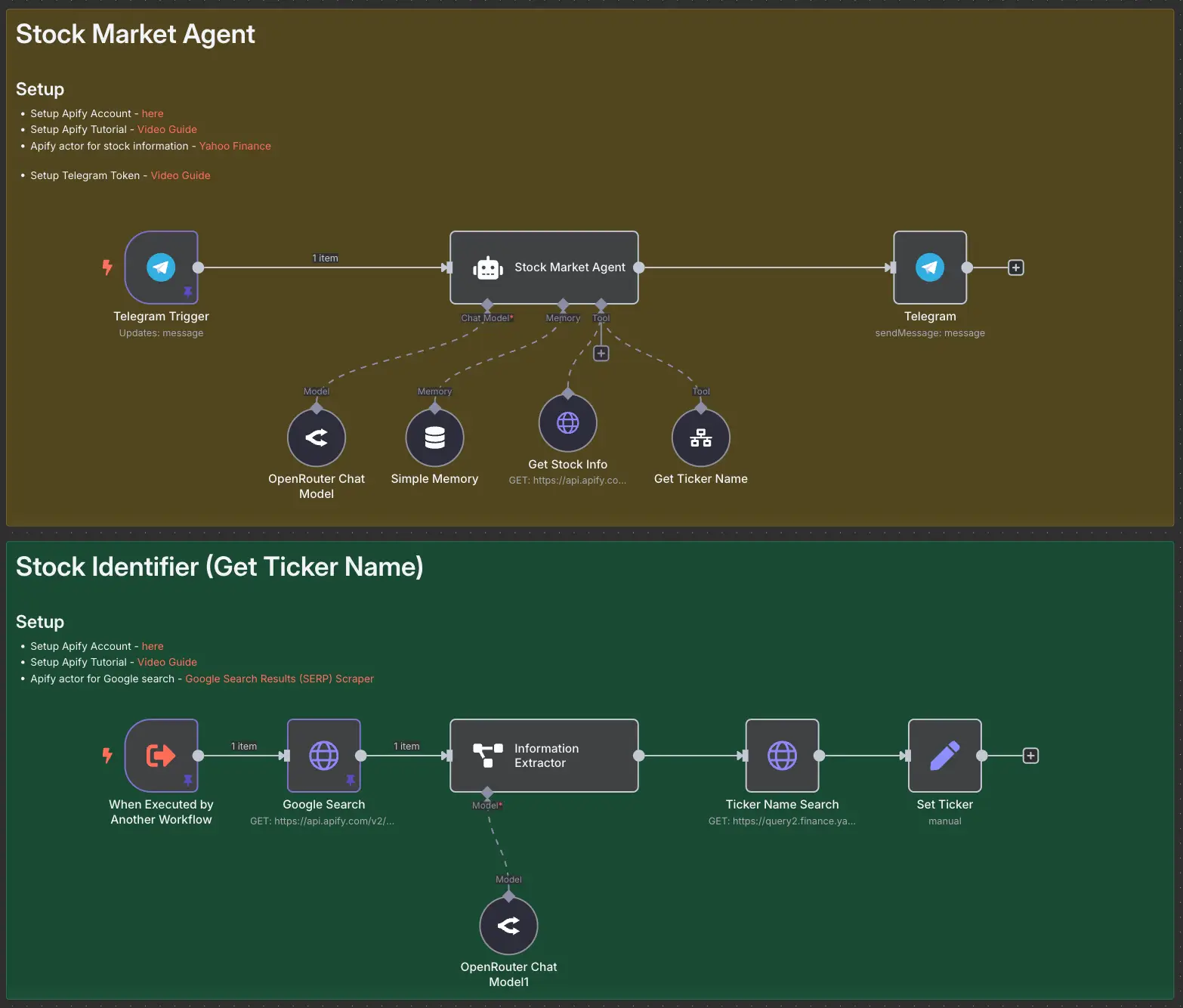
Stock Market AI Agent using n8n and Apify